 GTA VI Hub
Controller guide
Gameplay screenshot · AdnaanJnrGTA 6 Controller Guide: All Three PS5 and Xbox Layouts
Compare Default, Classic and Left-Handed PS5 and Xbox controls across eight gameplay situations.
Compare the Default, Classic and Left-Handed layouts on PS5 and Xbox. The tables cover eight situations: walking, aiming, melee, driving, flying, cycling, swimming and parachuting. Controller adjustments are listed at the end.
Each cell lists PS5 / Xbox. L3, R3, LS and RS mean pressing a stick. Left stick or right stick means moving it. A dash means the layout has no listed binding for that action in that context.
Global buttons: Touch pad / View opens the map. Options / Menu pauses the game.
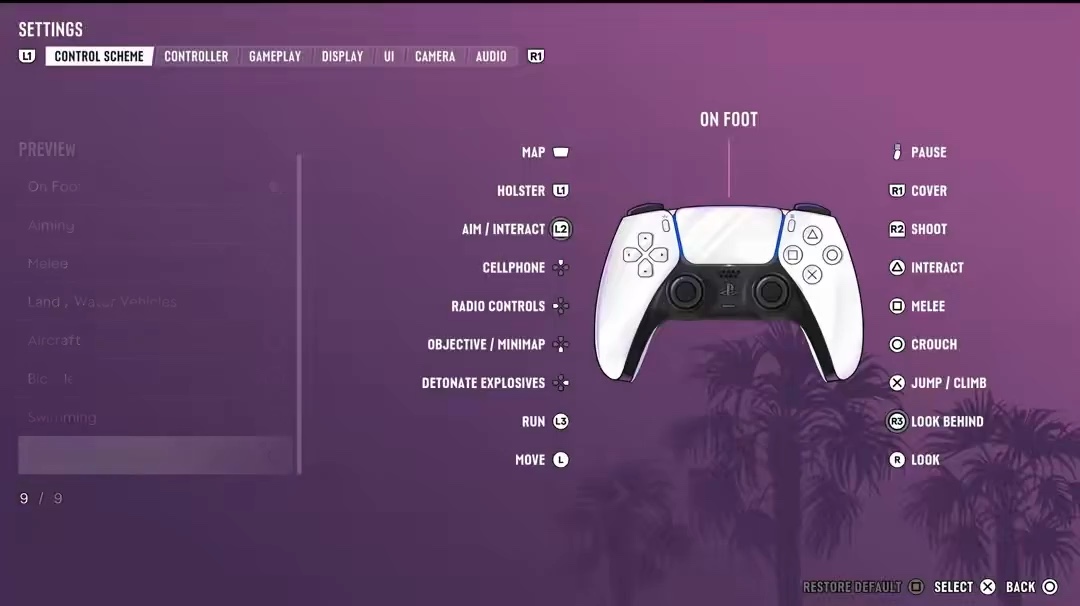
On foot
| Action | Default | Classic | Left-Handed |
|---|---|---|---|
| Run | L3 / LS | ✕ / A | R3 / RS |
| Move | Left stick | Left stick | Right stick |
| Look | Right stick | Right stick | Left stick |
| Jump / climb | ✕ / A | □ / X | ✕ / A |
| Crouch | ○ / B | L3 / LS | ○ / B |
| Rest (hold) | ○ / B | — | ○ / B |
| Melee attack | □ / X | ○ / B | □ / X |
| Aim / interact (hold) | L2 / LT | L2 / LT | R2 / RT |
| Shoot | R2 / RT | R2 / RT | L2 / LT |
| Take cover | R1 / RB | R1 / RB | L1 / LB |
| Holster / weapon wheel (hold to open) | L1 / LB | L1 / LB | R1 / RB |
| Look behind (hold) | R3 / RS | R3 / RS | L3 / LS |
| Shared action | PS5 / Xbox |
|---|---|
| Interact | △ / Y |
| Phone (hold: WAiNK) | D-pad ↑ |
| Radio (hold: radio menu) | D-pad ← |
| Objective / minimap (hold: quick navigation) | D-pad ↓ |
| Detonate explosives (hold: partner menu) | D-pad → |
While aiming
| Action | Default | Classic | Left-Handed |
|---|---|---|---|
| Aim / interact (hold) | L2 / LT | L2 / LT | R2 / RT |
| Shoot | R2 / RT | R2 / RT | L2 / LT |
| Cover / quick throw (hold to throw) | R1 / RB | R1 / RB | L1 / LB |
| Holster / weapon wheel (hold to open) | L1 / LB | L1 / LB | R1 / RB |
| Zoom / projectile arc | R3 / RS | R3 / RS | L3 / LS |
| Run | L3 / LS | ✕ / A | R3 / RS |
| Jump / climb | — | □ / X | — |
| Crouch | ○ / B | L3 / LS | ○ / B |
| Melee | □ / X | ○ / B | □ / X |
| Move | Left stick | Left stick | Right stick |
| Look | Right stick | Right stick | Left stick |
| Shared action | PS5 / Xbox |
|---|---|
| Quick swap weapon | △ / Y |
| Scope zoom in | D-pad ↑ |
| Scope zoom out | D-pad ↓ |
| Switch shoulders | D-pad ← |
| Detonate explosives | D-pad → |
Melee
| Action | Default | Classic | Left-Handed |
|---|---|---|---|
| Punch / kick | □ / X | ○ / B | □ / X |
| Block / dodge | ✕ / A | □ / X | ✕ / A |
| Grapple | R2 / RT | R2 / RT | L2 / LT |
| Lock on / strafe (hold) | L2 / LT | L2 / LT | R2 / RT |
| Move | Left stick | Left stick | Right stick |
| Look | Right stick | Right stick | Left stick |
Cars & boats
| Action | Default | Classic | Left-Handed |
|---|---|---|---|
| Accelerate | R2 / RT | R2 / RT | L2 / LT |
| Brake / reverse | L2 / LT | L2 / LT | R2 / RT |
| Steer | Left stick | Left stick | Right stick |
| Look | Right stick | Right stick | Left stick |
| Horn / nitrous | L3 / LS | L3 / LS | R3 / RS |
| Look behind (hold) | R3 / RS | R3 / RS | L3 / LS |
| Lights / duck (hold to duck) | ○ / B | □ / X | ○ / B |
| Melee | □ / X | ○ / B | □ / X |
| Shoot | R1 / RB | R1 / RB | L1 / LB |
| Holster / weapon wheel (hold to open) | L1 / LB | L1 / LB | R1 / RB |
| Shared action | PS5 / Xbox |
|---|---|
| Handbrake | ✕ / A |
| Exit vehicle | △ / Y |
| Phone (hold: interact) | D-pad ↑ |
| Left indicator (hold: vehicle menu) | D-pad ← |
| Right indicator (hold: partner menu) | D-pad → |
| Objective / minimap (hold: quick navigation) | D-pad ↓ |
Aircraft
| Action | Default | Classic | Left-Handed |
|---|---|---|---|
| Increase throttle | R2 / RT | R2 / RT | L2 / LT |
| Decrease throttle | L2 / LT | L2 / LT | R2 / RT |
| Pitch / roll | Left stick | Left stick | Right stick |
| Look | Right stick | Right stick | Left stick |
| Look behind (hold) | R3 / RS | R3 / RS | L3 / LS |
| Landing gear | L3 / LS | L3 / LS | R3 / RS |
| Shoot | R1 / RB | R1 / RB | L1 / LB |
| Holster / weapon wheel (hold to open) | L1 / LB | L1 / LB | R1 / RB |
| Shared action | PS5 / Xbox |
|---|---|
| Yaw left | □ / X |
| Yaw right | ○ / B |
| Exit aircraft | △ / Y |
| Phone | D-pad ↑ |
| Radio (hold: vehicle menu) | D-pad ← |
| Objective / minimap (hold: quick navigation) | D-pad ↓ |
| Partner menu (hold) | D-pad → |
Bicycle
| Action | Default | Classic | Left-Handed |
|---|---|---|---|
| Pedal / forward | R2 / RT | ✕ / A | L2 / LT |
| Sprint | ✕ / A | ✕ / A | R3 / RS |
| Brake / reverse (rear brake in Classic) | L2 / LT | L2 / LT | R2 / RT |
| Front brake | — | R2 / RT | — |
| Bunny hop | ○ / B | □ / X | ○ / B |
| Bell | L3 / LS | L3 / LS | ✕ / A |
| Steer / lean | Left stick | Left stick | Right stick |
| Look | Right stick | Right stick | Left stick |
| Look behind (hold) | R3 / RS | R3 / RS | L3 / LS |
| Melee | □ / X | ○ / B | □ / X |
| Shoot | R1 / RB | R1 / RB | L1 / LB |
| Holster / weapon wheel (hold to open) | L1 / LB | L1 / LB | R1 / RB |
| Shared action | PS5 / Xbox |
|---|---|
| Dismount | △ / Y |
| Phone (hold: interact) | D-pad ↑ |
| Objective / minimap (hold: quick navigation) | D-pad ↓ |
| Partner menu (hold) | D-pad → |
Swimming
| Action | Default | Classic | Left-Handed |
|---|---|---|---|
| Dive | R1 / RB | R1 / RB | L1 / LB |
| Surface | ✕ / A | □ / X | ✕ / A |
| Swim faster | L3 / LS | ✕ / A | R3 / RS |
| Move | Left stick | Left stick | Right stick |
| Look | Right stick | Right stick | Left stick |
| Look behind (hold) | R3 / RS | R3 / RS | L3 / LS |
| Aim / strafe (hold) | L2 / LT | L2 / LT | R2 / RT |
| Melee | □ / X | ○ / B | □ / X |
| Shoot | R2 / RT | R2 / RT | L2 / LT |
| Holster / weapon wheel (hold to open) | L1 / LB | L1 / LB | R1 / RB |
| Shared action | PS5 / Xbox |
|---|---|
| Radio (hold: radio menu) | D-pad ← |
| Objective / minimap (hold: quick navigation) | D-pad ↓ |
| Partner menu (hold) | D-pad → |
Parachute
| Action | Default | Classic | Left-Handed |
|---|---|---|---|
| Left brake | L2 / LT | L2 / LT | R2 / RT |
| Right brake | R2 / RT | R2 / RT | L2 / LT |
| Steer | Left stick | Left stick | Right stick |
| Look | Right stick | Right stick | Left stick |
| Look behind (hold) | R3 / RS | R3 / RS | L3 / LS |
| Shoot | R1 / RB | R1 / RB | L1 / LB |
| Holster / weapon wheel (hold to open) | L1 / LB | L1 / LB | R1 / RB |
| Shared action | PS5 / Xbox |
|---|---|
| Deploy parachute | ✕ / A |
| Detach parachute | △ / Y |
| Phone (hold: WAiNK) | D-pad ↑ |
| Radio (hold: radio menu) | D-pad ← |
| Objective / minimap (hold: quick navigation) | D-pad ↓ |
| Partner menu (hold) | D-pad → |
Fine-tune your controller
Open 【Pause → Settings】 and use the sections below.
| Menu | What you can change |
|---|---|
| Control Scheme | Pick Default, Classic or Left-Handed and use Preview to check bindings in each situation. |
| Controller | Adjust look and aim sensitivity, acceleration, response curve, stick deadzones, inversion and vibration. PS5 also offers DualSense trigger settings. |
| Gameplay → Combat | Choose Lock-On, Partial or Free Aim. Adjust Aim Assist Strength, Shooting Assist and Drive-By Assist here. |
| Gameplay → Accessibility | Change tap and hold assistance, hold delay, press or hold behaviour, and the Focus input. |
| Camera & Display | Adjust shake and bob in Camera. Use Display for motion blur and other visual effects. |
Use 【Restore Default】 or 【Restore All】 to reset. For a starting set of values, see GTA 6 Best Settings.
Reference: RedNote · youqia