 GTA VI Hub
GTA 6 Best Settings: What to Change Before You Play
Copy GTA 6 controller sensitivity, shooting assist, display, language, HUD, camera and audio settings by menu.
Set up the game before your first mission so the controls feel right from the start. This setup comes from the settings-menu recording posted by @AdnaanJnr on X on November 18, 2026. Keep Shooting Assist on. Sensitivity and deadzones are personal, so use these values as a starting point and adjust them in play.
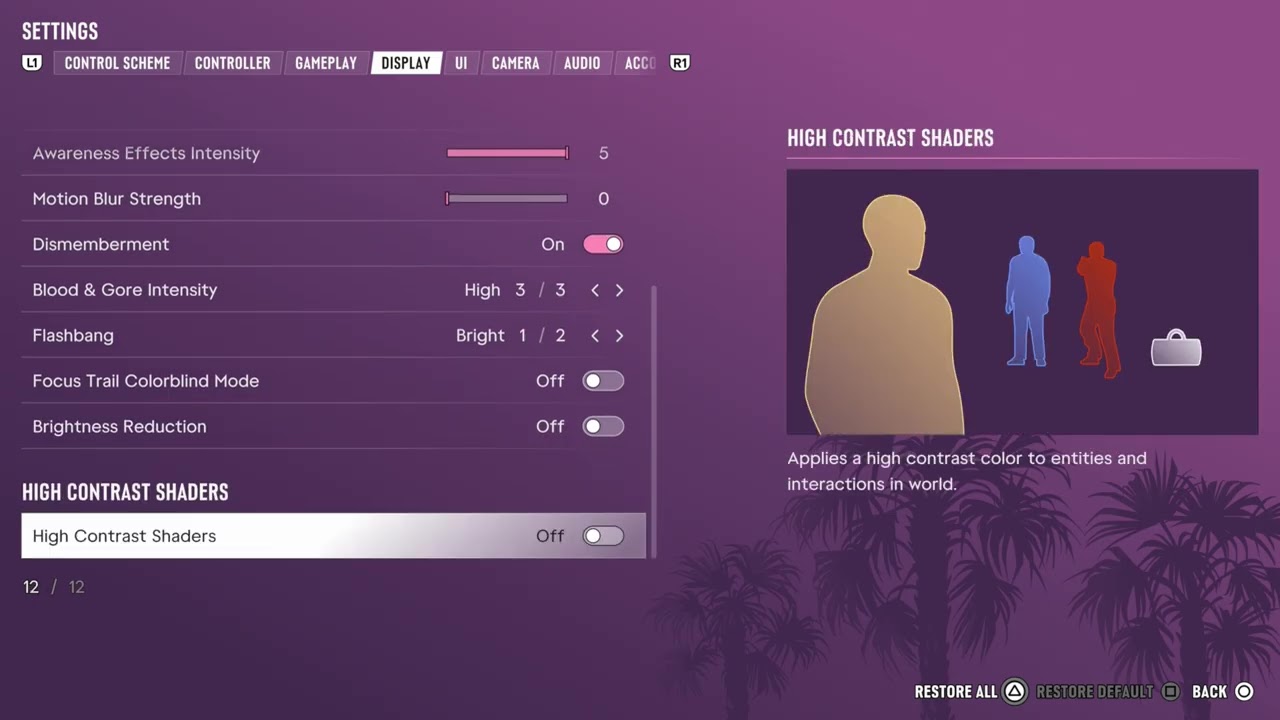
Start with three changes: under Controller, set horizontal and vertical look sensitivity to 9, aim sensitivity to 8 and both stick deadzones to 2. Under Gameplay → Combat, turn Shooting Assist on. Under Display → Visual Effects, set motion blur to 0.
To change the language, go to Settings → UI → Scaling & Readability → Language and choose your native language.
The recording uses a DualSense. Controller speaker, touch pad and adaptive-trigger options depend on your platform.
Control Scheme
| Setting | Recommended value |
|---|---|
| Control Scheme | Default |
Controller
Aim & Look Sensitivity
| Setting | Recommended value |
|---|---|
| Horizontal Look Sensitivity | 9 |
| Vertical Look Sensitivity | 9 |
| Horizontal Aim Sensitivity | 8 |
| Vertical Aim Sensitivity | 8 |
| Setting | Recommended value |
|---|---|
| Look Acceleration | 6 |
| Aim Acceleration | 6 |
| Aim Response Curve | Precision |
Inverted Controls
| Setting | Recommended value |
|---|---|
| Look | Default |
| Movement | Default |
| Setting | Recommended value |
|---|---|
| 3D Map Rotation | Default |
| Aircraft Movement | On |
DualSense Wireless Controller Features
| Setting | Recommended value |
|---|---|
| Vibration & Haptics Strength | 10 |
| Deadzone (Left Stick) | 2 |
| Deadzone (Right Stick) | 2 |
| Adaptive Triggers Resistance | On |
| Setting | Recommended value |
|---|---|
| Adaptive Triggers Vibration | On |
| Adaptive Speed Limiter | On |
| Touch Pad Button | Map |
| Light Bar Effect | On |
Gameplay
Combat
| Setting | Recommended value |
|---|---|
| Targeting | Lock-On |
| Aim Assist Strength | 4 |
| Lock-On Time | 4 |
| Lock-On Target Switch | Off |
| Shooting Assist | On |
| Setting | Recommended value |
|---|---|
| Drive-By Assist | On |
| Quick Draw | On |
| Cover Selection | Camera & Movement |
| Holster in Vehicle | Automatic |
Movement
| Setting | Recommended value |
|---|---|
| Movement Speed | Walk |
| Combat Movement Speed | Fast Walk |
| Stand & Sprint | Off |
To move faster by default, go to Settings → Gameplay → Movement and set Movement Speed to Fast Walk or Jog. This changes your pace when you push the movement stick all the way. Your sprint speed stays the same.
Accessibility
| Setting | Recommended value |
|---|---|
| Tap Assist | Off |
| Hold Delay | Off |
| Hold Assist | Off |
| Focus | L3 + R3 |
| Directional Button Actions | Hold |
| Aiming | Hold |
| Interact | Hold |
| Loadout | Hold |
| Setting | Recommended value |
|---|---|
| Fishing | Rotate |
| Nitrous | Hold |
| Simplified Mini Games | Off |
| Auto Drive | Restricted |
| Auto Equip Helmet | Off |
| Accessible Combat | Off |
| Reduced Vehicle Damage | Off |
Display
Screen
| Setting | Recommended value |
|---|---|
| Brightness Calibration | Calibrate for your screen |
| Safe Zone | Fit to your screen |
Visual Effects
| Setting | Recommended value |
|---|---|
| Player Status Effects Intensity | 5 |
| Hit Effects Intensity | 5 |
| Awareness Effects Intensity | 5 |
| Motion Blur Strength | 0 |
| Dismemberment | On |
| Setting | Recommended value |
|---|---|
| Blood & Gore Intensity | High |
| Flashbang | Dark |
| Focus Trail Colorblind Mode | Off |
| Brightness Reduction | Off |
| High Contrast Shaders | Off |
UI & Language
Scaling & Readability
| Setting | Recommended value |
|---|---|
| Language | Choose your native language |
| UI Text Size | Medium |
| Color Adjustments | Off |
| Setting | Recommended value |
|---|---|
| Map Blip Size | Default |
| Minimap Blip Size | Default |
| In-World Marker Size | Default |
Subtitles & Captions
| Setting | Recommended value |
|---|---|
| Subtitles | Mission Only |
| Closed Captions | Off |
| Size | Small |
| Setting | Recommended value |
|---|---|
| Speaker Names | Off |
| Background | Off |
Navigation
| Setting | Recommended value |
|---|---|
| Minimap | On |
| Minimap Size | Default |
| Compass | Off |
| GPS Route | On |
| GPS Turn Indicators | On |
| Setting | Recommended value |
|---|---|
| In-World Markers | On |
| Door Markers | On |
| Interaction Markers | On |
| Altimeter | On |
Reticle
| Setting | Recommended value |
|---|---|
| Persistent Center Dot | Off |
| Reticle Hit Markers | On |
| Reticle Size | Default |
| Reticle Shape | Complex |
| Setting | Recommended value |
|---|---|
| Equipped Reticle Visibility | 10 |
| Aiming Reticle Visibility | 10 |
| Reticle Messages | On |
| Projectile Arc | Off (Toggle On) |
Combat HUD
| Setting | Recommended value |
|---|---|
| Weapon Preview | On |
| Ammo | On |
| Setting | Recommended value |
|---|---|
| Threat Indicators | On |
| Damage Region Highlights | On |
HUD Notifications
| Setting | Recommended value |
|---|---|
| Ticker Feed | On |
| Criminal Profile | On |
| Relationship | On |
| Help Text | On |
| Reminder Tips | On |
| Objective | On |
| Setting | Recommended value |
|---|---|
| Mission Update | On |
| Phone Notifications | On |
| Area Discovery | On |
| Area Names | On |
| Street Names | Off |
Progress Notifications
| Setting | Recommended value |
|---|---|
| Progress Notifications | On |
| Weapons | Off |
| Vehicles | Off |
| Animals | Off |
| Collections | On |
| Setting | Recommended value |
|---|---|
| Stunts | On |
| Basketball | On |
| Challenges | Off |
| Map Updates | On |
Player & Vehicle Status
| Setting | Recommended value |
|---|---|
| Player Vitals | On |
| Wanted Stars | On |
| Heat Indicators | On |
| Setting | Recommended value |
|---|---|
| Money | On |
| Vehicle Name & Status | On |
Prompts
| Setting | Recommended value |
|---|---|
| In-World Prompts | On |
| Prompt Visibility | 7 |
| Vehicle Prompt | Off |
| Setting | Recommended value |
|---|---|
| Mini Game UI | On |
| Bottom Right Prompts | On |
| Prompt Pinning | On |
Activities
| Setting | Recommended value |
|---|---|
| Mini Scoreboard | On |
| Central Messages | On |
| Activity Timers & Stats | On |
Units of Measurement
| Setting | Recommended value |
|---|---|
| Distance | Imperial |
| Weight | Pounds |
| Setting | Recommended value |
|---|---|
| Temperature | Fahrenheit |
| Clock Format | 12 Hour |
Camera
On Foot
| Setting | Recommended value |
|---|---|
| Height (On Foot) | Medium |
| Horizontal Follow Speed | 10 |
| Vertical Follow Speed | 10 |
Land & Water Vehicles
| Setting | Recommended value |
|---|---|
| Height (All Vehicles) | Medium |
| Horizontal Follow Speed (Driver) | 10 |
| Vertical Follow Speed (Driver) | 10 |
| Follow Delay (Driver) | 0 |
| Setting | Recommended value |
|---|---|
| Horizontal Follow Speed (Passenger) | 4 |
| Vertical Follow Speed (Passenger) | 4 |
| Follow Delay (Passenger) | 10 |
Comfort
| Setting | Recommended value |
|---|---|
| Camera Preferences | On |
| Weapon Sway | On |
| Camera Shake | On |
| Setting | Recommended value |
|---|---|
| Camera Bob | 10 |
| Phone Display | Default |
Aircraft, Underwater & Cinematic
| Setting | Recommended value |
|---|---|
| Horizontal Follow Speed (Aircraft) | 5 |
| Vertical Follow Speed (Aircraft) | 5 |
| Follow Roll | On |
| Follow Roll Speed | 5 |
| Roll Deadzone Range | 10 |
| Setting | Recommended value |
|---|---|
| Horizontal Follow Speed (Underwater) | 2 |
| Cinematic Kill Shot Frequency | 3 |
| Cinematic Vehicle Crash Frequency | 3 |
| Idle Camera | On |
Audio
Setup
| Setting | Recommended value |
|---|---|
| Mono Audio | Off |
| Tinnitus Reduction | Off |
| Controller Speaker | On |
| Controller Cop Scanner | Off |
| Setting | Recommended value |
|---|---|
| GPS Voice | Off |
| Mute Licensed Music | Off |
| Vehicle Radio | Default |
Volume & Narration
| Setting | Recommended value |
|---|---|
| Master Volume | 10 |
| SFX | 10 |
| UI | 10 |
| Dialogue | 10 |
| Setting | Recommended value |
|---|---|
| Music | 10 |
| Media | 10 |
| Narration | No readable value in the recording; keep your preference |
Reference video
Watch @AdnaanJnr’s settings-menu recording on X (November 18, 2026)